Manage products
Open Dashboard → Products to find, edit and preview your products.
| I want to… | Follow this guide |
|---|---|
| Add a new product | Add your first product, with screenshots |
| Add colours, sizes or combinations | Variants and combinations |
| Enter quantities or restock | Stock Management |
Video
Find and edit a product
- Open Products.
- Search for the product or use the category and status filters.
- Open Edit on its card.
- Change the needed fields and save.
- Reopen the product to check the change.
Use Preview in store to see the buyer's page, or Share to copy its link.
Change photos
In the product editor, add your new photos and wait for their thumbnails.
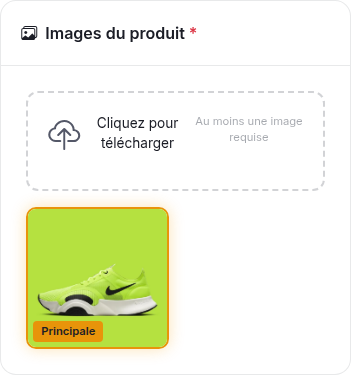
This is the French dashboard. Principale means the main photo.
- Select a photo's star to make it the primary photo.
- Drag the other photos into order, or use their arrow buttons.
- On a phone, hold a thumbnail briefly before dragging.
- Remove a photo only when you no longer want it in the product.
Save, then preview the product. If a variant needs a particular photo, link that option to the image.
Write the description
Describe what the buyer gets: material, dimensions, included items and available sizes. Use short paragraphs or a short list.
The toolbar lets you format text, insert links and add media. Use its image button to insert a description image. Do not rely on pasting an image from your clipboard.
Use Preview to check the description before saving. The description generator is optional.
Update prices
| Field | What to enter |
|---|---|
| Price | The selling price paid by the buyer. |
| Compare price | The previous price displayed crossed out. Leave empty without a discount. |
| Cost | Your purchase cost. It is not displayed to buyers. |
| SKU | Your own reference code for finding and identifying the product. |
The compare price must be higher than the selling price. For a variant that costs more, enter a price difference, not the full price again.
Choose the right stock field
Use one of these approaches:
- One quantity for the product: turn on Track stock and enter the available quantity.
- One quantity per option: use Track variant stock.
- One quantity per colour and size together: use Track combination stock.
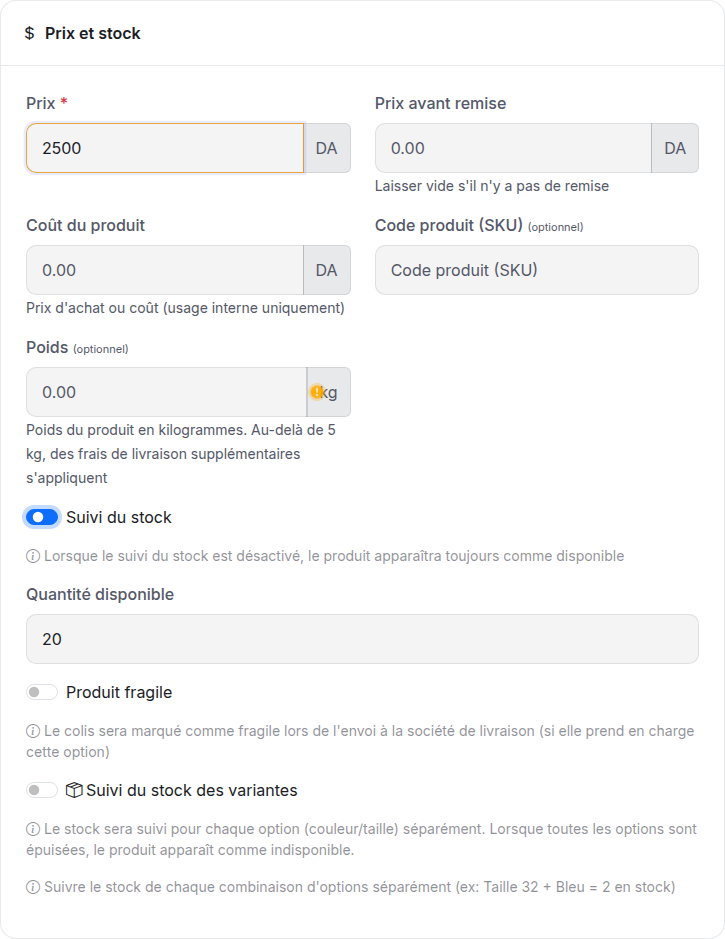
When variant or combination stock is on, product-level stock entry is disabled. Follow the combination example to fill the right fields.
To choose whether orders deduct stock at confirmation or as soon as they arrive, use Orders → Display settings → Stock deduction. See Stock Management.
Choose a category and status
Select the categories that help buyers find the product. You can create categories from Dashboard → Categories.
| Status | Use it when |
|---|---|
| Active | The product is ready to appear in the store. |
| Active but hidden | You want to sell it through its direct link. |
| Draft | You are still preparing it. |
A hidden product is still buyable by link. Use Draft if it should not be published.
Add a quantity offer
In Offers & bundles, press Add offer and fill in:
- A title, such as Pack of 2.
- The number of pieces, such as 2.
- The final price for the whole offer, such as 4,500 DA.
You can also add a compare price, badge, image or free shipping. Check these before saving. Free shipping removes the delivery fee for that offer.
If the product has variants, the buyer can choose them for each piece. Offer Variant Popup provides a dedicated popup for that selection.
Fill shipping information when needed
Enter the correct weight if your delivery pricing uses it. The Fragile setting marks the parcel for couriers that support it.
Parcel dimensions and insurance appear for supported linked couriers. Check Shipping for delivery setup.
Edit several products
Select the product cards to show the bulk-action toolbar. You can change categories, prices, stock, status or featured placement.
Bulk stock changes apply to simple product stock. Products using variant or combination stock are skipped. Update those in their editor or Stock Management.
Check the selected products and entered value before applying a bulk change.
Delete removes a product permanently. Use Draft if you only want to take it off sale while keeping it.
Import an existing catalogue
Open Products → Bulk import, choose a file in one of the formats listed on that page, then check the preview before importing.
Review the handling of existing SKUs and products without images before starting. Product and import availability depend on your plan.
For the Shopify connection, see Shopify Import.
Product links and search results
The product name, description and primary image help describe the product in search and shared links. There is no separate product SEO panel to fill in.
Changing the product name can change its address. After renaming, use Share to get its current link and check any ads that use an older link.