Manage and update stock
Use this page when new stock arrives or you need to correct a quantity. First, enable stock tracking on the product.
The Stock Management add-on is available on the Free plan and above. It is paused on stores using the Digital theme.
1. Open Stock Management
If you have not activated it yet:
- Open Dashboard → Add-ons.
- Find Advanced Stock Management (Gestion avancée du stock) under Inventory.
- Press Activate.
- Open Stock Management from the sidebar.
You can also open Stock Management directly.
Only products with stock tracking enabled appear here. The add-on does not enable tracking for you.
2. Find your product
Search by the product name or product SKU. If it does not appear, clear the stock filter and try again.
The example below is our saved sports-shoe product. It has 20 pairs across four combinations. The screenshots show the real French dashboard with demonstration data.
For a product with variants or combinations, press Details (Détails) to see the individual quantities.
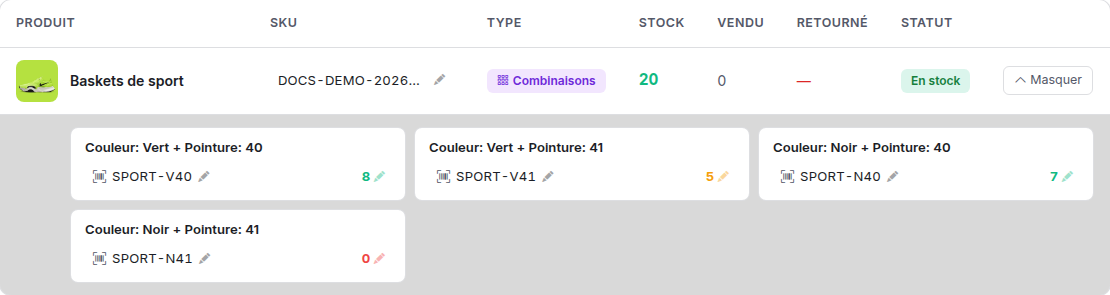
Check: you are looking at the right product, colour and size. Green + 40 has 8 pairs; Black + 41 has 0.
3. Enter the new quantity
Suppose 4 more Green + 40 pairs arrive. You had 8, so your new total is 12.
- Press the quantity 8, or its pencil, beside Green + 40.
- Replace it with 12.
- Press the check mark to save. On a keyboard, you can press Enter.

The field is open with the old quantity 8. Replace it with 12, then save.
Enter the new total, not the delivery quantity. Entering 4 would replace the stock with 4.
The cross cancels the edit. On a keyboard, Escape also cancels.
For a product using simple stock, press its quantity directly in the main row. There is no combination detail to open.
4. Check after saving
Wait for the saved message, then reload the page and search for the product again.
Check: Green + 40 now shows 12. The other quantities should be unchanged. Its total would now be 24 pairs.
A buyer who already has the storefront open may need to refresh it to see the new availability.
What the stock numbers mean
| Display | Meaning |
|---|---|
| Product stock | One quantity for the whole product. |
| Variant stock | A separate quantity for each option. |
| Combination stock | A separate quantity for each colour and size together. |
| 0 | That tracked item is sold out. |
| Unlimited | No fixed quantity has been entered for that option. |
The headline total sums the tracked options or combinations. Unlimited quantities do not add units to that total. Open Details if a total does not match what you expected.
Do not replace every combination with the total stock of the whole product. Enter each combination's own quantity.
When orders reduce stock
Open Orders → Display settings using the gear button. In Stock deduction, choose:
- At order confirmation: the default.
- As soon as the order arrives: stock is reduced from receipt of a new order, before confirmation.
Save the setting. This applies to the store, not just the product you are editing. A team member needs permission to edit orders to change it.
Cancellation or return restores stock that was deducted for the order. The Sold and Returned columns show recorded activity; they are not fields for adding new stock.
Find items that need attention
Use In stock, Low stock or Out of stock to narrow the list. You can also sort by quantity or name.
You can edit a product or option's SKU using its pencil. Keep your reference codes distinct; a duplicate badge helps you spot repeated codes.
If you get stuck
| Problem | What to do |
|---|---|
| Product missing | Enable stock tracking in its editor, save, then clear the filters here. |
| Total cannot be edited | Press Details and edit the option or combination quantity. |
| Unlimited quantity has no pencil | Open the product editor and enter a fixed quantity there. |
| Wrong quantity after restocking | Enter old stock plus the new delivery, not just the delivery amount. |
| Save failed | Keep the intended quantity noted, read the error and retry after correcting it. Reload to confirm the saved value. |
| Add-on is paused | Stock Management is not active on the Digital theme. |