Sell Digital Products in Algeria with CIB and Edahabia

You have made a useful PDF, a template or a small design pack. Selling it in Algeria comes down to three questions: what does the buyer receive, how do they pay, and when can they open it?
This guide takes one product from an idea to a working sales process, with a sample offer, a payment comparison and a realistic setup budget.
Published by DZBuild, the platform used in the setup below. Product details and prices checked on 26 September 2026. Product ideas are examples, not sales forecasts.
Start with one file that solves one problem
Pick something you can demonstrate before asking anyone to pay. A buyer should be able to see the result and understand what they can change.
| Product idea | Show before purchase | State clearly |
|---|---|---|
| A CV template in Arabic and French | A filled-in sample with fictional details | File formats and the app needed to edit it |
| Revision sheets you wrote yourself | A sample lesson and its answers | Subject, level, language and contents |
| A stock-tracking spreadsheet | A screen with sample products | Required software and included formulas |
| A printable invitation pack | The finished design | Dimensions, editable fields and printing instructions |
Use material you created or have permission to sell. Start with a small finished pack. A large video course has different hosting and support needs from a PDF download.
Show a useful preview in your social posts, then link to the product page. Keep the full paid file out of the preview.
Choose how the customer will pay
On a DZBuild Digital store, card payments and manual transfers follow different delivery paths.
| Payment choice | What the buyer does | What you do |
|---|---|---|
| CIB / Edahabia through your connected Slick-Pay account | Pays on the card payment page | Configure the account and stock the deliverable. Verified payment triggers allocation and automatic delivery when the required items are available. |
| BaridiMob or another configured manual transfer | Transfers to your account and submits the requested receipt | Check that the money arrived, confirm the digital order, then choose delivery with email. |
A payment screenshot is something to check, not proof that the money reached you. For manual transfers, check your account before confirming the order.
Card payment requires your own enabled Slick-Pay account. Opening a DZBuild store does not approve that account for you. Check the provider's merchant requirements and fees before offering card checkout.
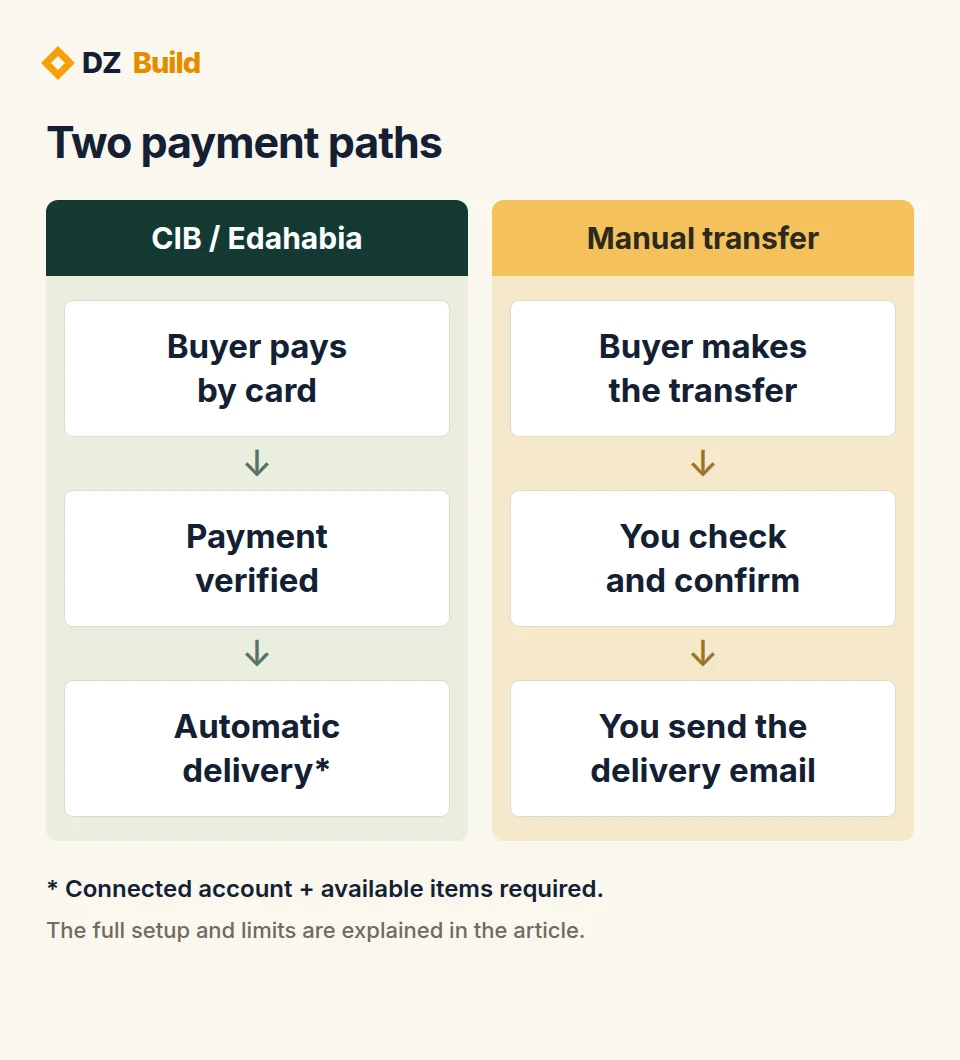
If you use manual transfers, publish the hours when you review them. If you use cards, keep enough deliverable units available and watch for paid orders that still need attention. Avoid promising delivery within a fixed number of seconds.
Write the offer before designing the page
A clear product page answers the questions a buyer would otherwise send in a message. Here is a fictional example you can adapt.
| Page detail | Example for a CV pack |
|---|---|
| Product name | Editable CV pack in Arabic and French |
| Included | Two editable documents, PDF previews and a short instruction sheet |
| Compatibility | Name the editor and versions you actually tested |
| Preview | One completed CV using invented personal details |
| Delivery | Explain the card flow and the manual-review hours separately |
| Help | Tell buyers how to reach you if a file will not open |
Add your actual price, file size, usage permission and refund terms before publishing. Do not promise interviews or a job. The product is a template; show how it helps someone prepare their CV.
For more examples, see writing product descriptions that sell.
Set up payment and file delivery in DZBuild
Create a store using the Digital theme, then add your first product with its price, preview images and description.
- Activate Payment Gateway. Open the digital payment settings in the dashboard. Add the CIB / EDAHABIA method for your Slick-Pay account, or configure a manual method. The card setup includes a connection test.
- Activate Secure Storage. Open Secure Storage, upload the file and attach it to the right product or variant.
- Set the deliverable quantity. A quantity of 10 lets that file supply 10 purchases of one unit each. It uses 10 storage slots. Monitor the available quantity as you sell.
- Check the delivery path. A verified card payment allocates the available items and attempts the delivery email. A manual order needs your confirmation; then use Deliver + send email. If items are missing or email delivery fails, the order needs your attention.
Files can be up to 20 MB each. For a pack with several files, put them in one ZIP archive before uploading. This suits PDFs, documents and small archives. Do not plan a large video library around that upload limit.
The buyer's email directs them to the store's tracking page. To access files there, they enter the order number and the last four digits of the phone number used for the order. File links expire after 30 days and allow three downloads by default. Explain the limit and ask buyers to save their download.
Budget for the complete setup
For a store on the monthly Pro plan using payment methods and stored-file delivery, the starting fixed cost is:
| Item | Monthly cost |
|---|---|
| DZBuild Pro plan | 1,000 DZD |
| Payment Gateway addon | 500 DZD |
| Secure Storage, 300-item tier | 500 DZD |
| Total for this setup | 2,000 DZD |
These are separate subscriptions. The total excludes payment-provider fees, an optional domain, advertising and any other addons you choose. A storage item is a deliverable unit, not a gigabyte or a promise of unlimited downloads. Check current plan prices and the addon prices shown in your dashboard before paying.
Test the buyer's journey before sharing the link
Use your own details for a controlled test, then check these points:
- On a phone, can you read the preview, price and delivery terms without zooming?
- Does the payment method open the expected payment page or show the correct transfer details?
- After verified payment or manual confirmation, is the correct file available for the correct product variant?
- Does the delivery email reach the address used at checkout, and does its tracking link work?
- Can the buyer download, save and open the file in the software you named?
Also inspect a pending order. It should not give access to the paid file before payment verification or your confirmation. If a payment is pending, check its status before asking the buyer to pay again.
Questions before you launch
Can I sell a PDF without a courier?
Yes. A Digital store delivers access to a file rather than a physical parcel. You still need a working payment method, enough deliverable units and a clear product description.
Does every digital order deliver automatically?
No. The configured card flow supports automatic delivery after verified payment when the required items are available. Manual transfers require your review and confirmation. An empty inventory or a failed delivery email needs follow-up.
Can download limits stop someone sharing the file?
They limit access through the download link. They cannot stop a buyer sharing a copy they have already downloaded. State the permitted use clearly and sell work you have the right to distribute.
Ready to prepare your first product? Create your DZBuild account, choose Digital and build one complete offer. Have the preview, file and delivery instructions ready before you send buyers to it.