Build an E-commerce App for Algeria with DZBuild.dev

A catalog export, an order notification or a tool for an agency managing client stores starts with the same question: how does the app get the store owner's permission to access the right data?
dzbuild.dev is DZBuild's developer portal. It brings together the e-commerce API, app starters, installation guides and resources for coding assistants. This guide follows a practical first project: an app that lets a merchant download their product catalog as CSV, with permission to read products only.
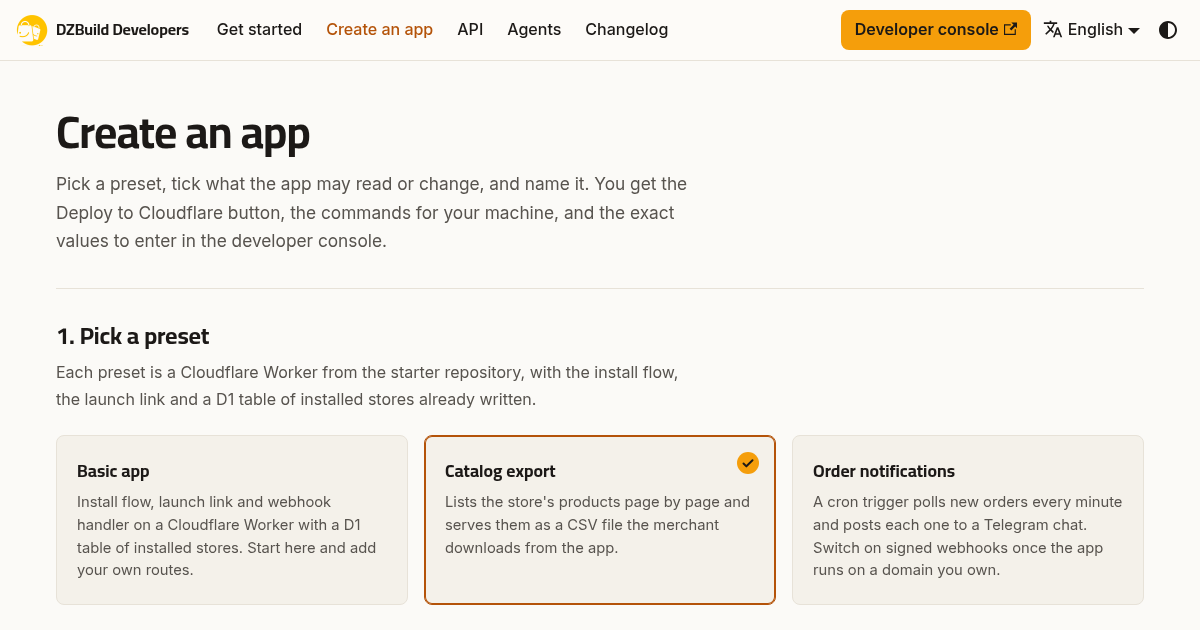
The public app creator, captured on 1 October 2026. The screenshot contains no merchant account or store data.
What you can build with the DZBuild API
A DZBuild app is a web service you host. A merchant approves its permissions on DZBuild, and your server receives an access token for that store. Your app then calls the REST API for the resources covered by those permissions. Each installed store has its own token. The developer introduction explains the model.
For Algerian e-commerce projects, the API includes products, orders, customers, delivery, shipping settings, landing pages, store customization, analytics and WhatsApp order templates. Access depends on the requested permissions and the relevant feature requirements. Sending a parcel or a WhatsApp message is a separate action; merely installing an app does neither.
Possible projects include a catalog export, a connection to your own reporting tool, or order alerts for an operations team. The official starters provide specific working foundations:
| Starter | What it provides | When to choose it |
|---|---|---|
| Basic app | Store installation, a launch link and token handling | You want to add your own app screens and business logic |
| Catalog export | A product list and a CSV download | You want a first project that reads products without changing the store |
| Order notifications | New-order alerts to Telegram using polling by default | You need an alerting example and understand that order data will reach another service |
The app creator generates the setup instructions for the selected starter. The public starter repository also includes a Node.js example for your own server.
App installs and personal API keys have different requirements
A merchant does not need Enterprise solely to install an approved app. App installs are available across store plans, subject to the app's minimum plan and any requirements of the feature it uses. Personal merchant API keys require an active Enterprise subscription. The app concepts and API reference explain the distinction.
For a tool distributed to merchants, use the app installation flow. The owner sees the permissions before approving, and the app receives a separate token for each store. Avoid asking a client to share their dashboard password or paste a personal API key into a chat.
Draft apps are restricted to stores owned by the developer's account. Being a team member on someone else's store is not enough. Approval is required before other merchants can install the app.
Build a catalog export app
The catalog starter uses products:read. It does not need permission to read customers, change orders or send parcels. That makes its result easy to verify: the product list should match the store, and the downloaded file should contain the expected product rows.
You need a DZBuild account that owns a store and hosting for your app. For the Cloudflare starter, you also need your own Cloudflare account and the deployment access described in its README. Hosting limits and charges are set by your provider.
1. Select Catalog export
Open Create an app, choose Catalog export and keep only the permissions that the feature uses. Choose your own app name. The registration rules do not allow “dzbuild” inside an app's name.
The creator gives you a deployment option, local commands and the fields to copy into the developer console. Keep the catalog starter README open while you work; it contains the setup details for this preset.
2. Deploy and complete the storage setup
Deploy the starter to your hosting account. The deployment button alone does not finish the catalog starter's setup. Its README requires applying the included database migration after the initial button deployment, or configuring its documented deploy command to apply it. This prepares the app's own storage for installation data.
Use the exact HTTPS address assigned to your app. The starter can begin on a workers.dev address. If you later use webhooks, you will need a suitable domain you own.
3. Register the app and store its credentials privately
Open the developer console and create an app. Copy the callback and launch addresses from your deployment instructions, select products:read, and supply your app's descriptions and support details.
For an app hosted at the example address https://app.example.com, the starter's addresses would be:
| Registration field | Example value |
|---|---|
| Redirect URI | https://app.example.com/oauth/callback |
| Launch URL | https://app.example.com/launch |
| Scope | products:read |
| Webhook URL | Leave empty for the first catalog example |
Replace the example host with your own. Callback addresses must match the registered value exactly, including the trailing slash. Follow the getting-started guide for the full registration form.
Set the starter’s client ID to the one from your registration and redeploy as its README instructs. Save the client secret and signing secret in your hosting provider's secret storage as the starter instructs. Keep store access tokens on your server. None belongs in browser code, a screenshot, a public repository or a prompt sent to a coding assistant.
4. Install it on a store you own
Open your app's installation page and approve the product-read permission for your own store. The starter handles the OAuth authorization flow with PKCE and stores the token for that installation.
Draft testing uses real store data. It is not an isolated sandbox. Use a store you control and begin with this read-only feature. Adding write permissions later requires tests that account for real changes and side effects.
The documented first API check is GET /v1/whoami, which confirms the token's store and permissions. In your own secure development environment, where DZ_TOKEN already holds the installation token, the request is:
curl -sS https://api.dzbuild.app/v1/whoami \
  -H "Authorization: Bearer $DZ_TOKEN"
This reads the installation identity. It does not create or modify an order. Do not share the returned account identifiers or token.
5. Open the app and check the CSV
Use the app's Open action in the merchant dashboard, then download the catalog. Compare the file with products in your test store. The starter exports product ID, name, slug, SKU, price and status; its README documents UTF-8 output for Arabic names.
Check an empty catalog, a product name containing Arabic, and a name containing a comma or quotation mark. For a larger catalog, check the exported row count rather than assuming the first screen shows everything. The starter's product screen shows up to 200 products; the export follows pagination, within the hosting provider's execution limits.
Treat a failed export as an error to fix. A missing permission, expired app session or request limit must not be presented to the merchant as a complete catalog.
Connect a coding assistant to the documentation
The agent connection page supplies setup instructions for coding assistants. The public @dzbuild/docs-mcp server gives compatible clients the developer documentation and API reference. It does not access your merchant account or operate your store.
You can also give an assistant the documentation index, the app-building skill and the OpenAPI description. A focused request would be:
Read the DZBuild developer documentation and the catalog starter. Help me build a catalog export app using only
products:read. Keep credentials in server-side secret storage. Test empty catalogs, Arabic names, pagination, denied installation and revoked access.
Review the generated code and run its tests before connecting it to store data. The Build with AI guide lists common mistakes, including requesting unnecessary permissions and assuming one token can access several stores.
Before adding webhooks or actions that change a store
The catalog example works without a webhook. For order events or uninstall notifications, register and verify the webhook URL in the developer console. A workers.dev address is not accepted as a webhook destination; the app needs a suitable domain you own. App-install tokens cannot manage the merchant /v1/webhooks endpoint. Follow the app webhook guide.
Verify webhook signatures before processing the body, handle duplicate deliveries, and stop using a store's token when access is revoked. POST, PATCH and DELETE requests need an Idempotency-Key, and a 429 response requires waiting according to Retry-After. The rate-limit guide describes those rules.
For WhatsApp functionality, read the separate WhatsApp integration guide before adding sends. App permission does not remove the feature's plan or message-credit requirements.
Prepare the app for merchant review
Before submitting, test the app on your own store and prepare its logo, descriptions in English, Arabic and French, support email, HTTPS launch address, callback address and required permissions. If you configured a webhook, it must be verified. The review checklist gives the exact requirements.
Describe what the app reads, what it changes and how merchants can get help. A catalog export should request product-read permission; adding unrelated access makes its purpose harder to assess. Review the security requirements for handling credentials and merchant data.
Once approved, the app becomes available to eligible merchants. Approval is not a promise of installs or revenue: merchants still need a clear use for the app and reliable support.
Questions before you start
Does DZBuild host my app?
You host the app on your own hosting account or server. DZBuild supplies the store connection and API. The official starters support Cloudflare Workers, and the repository includes a Node.js example.
Can I test a draft app on a client's store?
Draft installations work only on stores owned by your developer account. A client store requires app approval before its owner can install it.
What happens when a merchant uninstalls?
The installation token is revoked. The app must handle the loss of access. The catalog starter documents handling unauthorized responses when no uninstall webhook is configured.
Where should I begin?
Open Create an app on dzbuild.dev, select Catalog export, and follow the starter's setup instructions alongside the getting-started guide. If you still need a DZBuild account, use the registration page.