Free Offline POS Software for Windows, Built for Algeria

Yes, there is a free cashier program for Algerian shops: DZBuild POS. It runs on Windows 10 and 11 and handles the till, stock, customer credit (kridi), suppliers and the invoices Algerian law asks for. It costs 0 DA, needs no licence key, no subscription and no account, and it keeps selling with no internet connection. Download DZBuild POS for free.
We build it at DZBuild and publish its source code under the GPL-3.0 licence. This guide covers version 1.1.0, released on 10 October 2026: the till, the 2025 stamp duty rule on cash, kridi, the 25 trade templates, and the tools for pharmacies, butchers, jewellers and phone shops that the download page does not list.
DZBuild POS at a glance
| Price | 0 DA. No licence key, no subscription, no account, no time limit |
| System | Windows 10 (version 1809 or later) or Windows 11, 64-bit or 32-bit |
| Internet | Not needed to sell. Used only for updates and the optional DZBuild store link |
| Languages | Arabic (right to left), French and English, on screen and on paper |
| Made for | An ordinary shop PC with 4 GB of RAM, such as a Celeron with a hard disk |
| Licence | Open source, GPL-3.0-or-later, code on GitHub |
| Version | 1.1.0, released on 10 October 2026 |
Each user works in their own language, each customer can receive documents in theirs, and a single ticket can print in a language other than the screen's. A cashier can sell in Arabic while the invoice for a French-speaking customer prints in French.
Which setup to download
The download page at dzbuild.com/pos (Arabic, with a French version) links straight to the files on GitHub. Pick the one that matches the PC:
| Setup | Size | Use it for |
|---|---|---|
| 64-bit setup | about 14 MB | Most PCs with Windows 10 or 11. It installs WebView2 if the PC lacks it |
| 32-bit setup | about 14 MB | Older PCs running 32-bit Windows 10 |
| 64-bit offline setup | about 220 MB | PCs with no internet. Copy it to a USB stick |
| 32-bit offline setup | about 196 MB | Older 32-bit PCs with no internet |
The setups are not code-signed yet, so Windows may show "Windows protected your PC". Click More info, then Run anyway, but only if you downloaded the file from dzbuild.com/pos or from the GitHub releases. A technician can also compare its SHA-256 with the SHA256SUMS.txt file of the release. Uninstalling never deletes the shop's data: sales, the action log and the backups stay on the PC.
What a sale looks like at the till
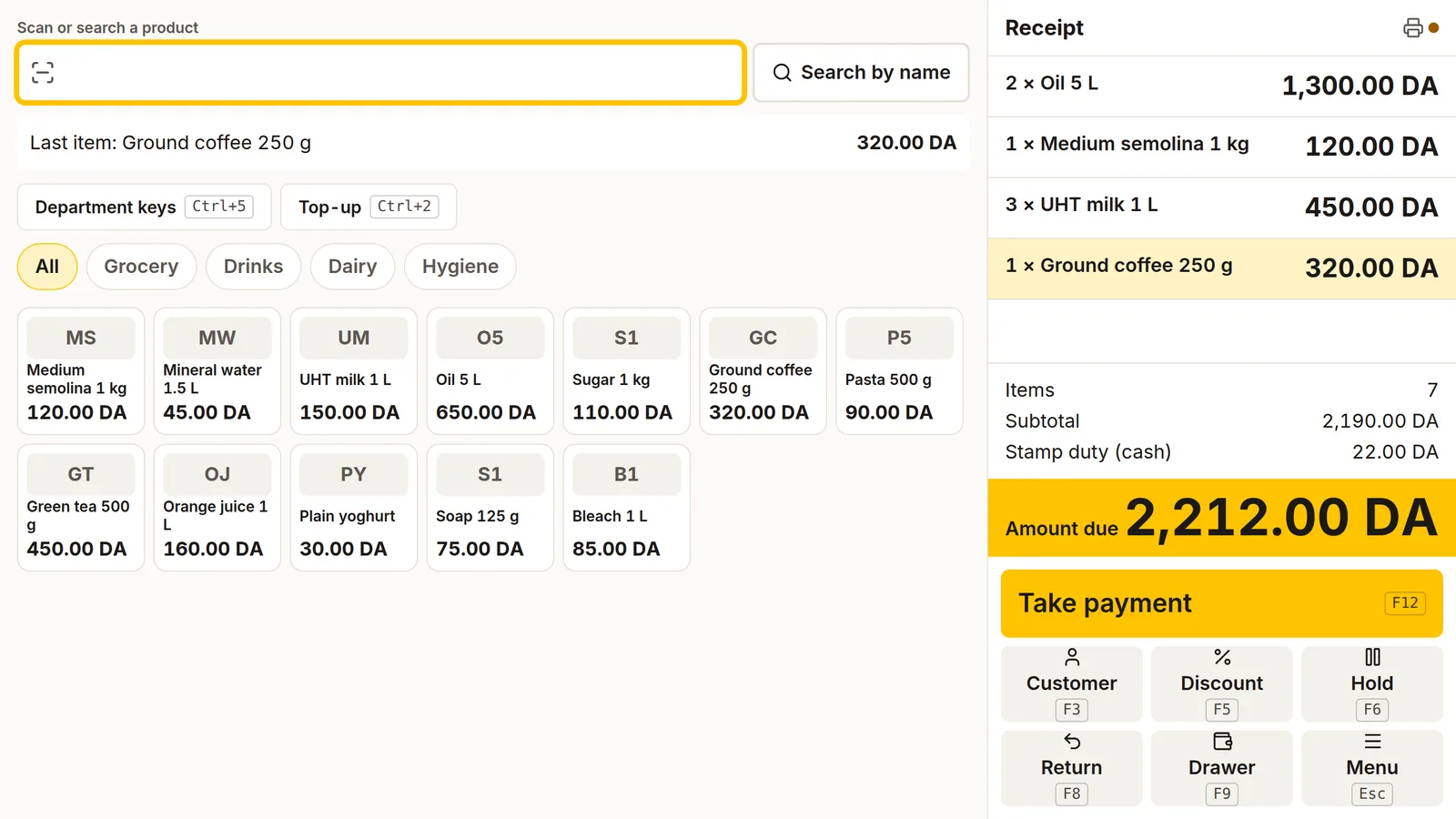
The sale screen of DZBuild POS 1.1.0, with demo data.
The till is built for a keyboard and a barcode scanner. A scan is read wherever the cursor is, so the cashier never has to click into a field first. To sell three of the same item, type 3, then the star key, then scan. On a French AZERTY Windows many scanners type a dash instead of the 6, and every Algerian barcode starts with 613: the till corrects this by itself, so the code arrives intact. A Learn my scanner button sets up the rest from one scan.
Name search ignores accents and Arabic vowel marks, folds the forms of hamza and finds "الحليب" when you type "حليب". These keys work from the first day, and the owner can move all of them except F11 in Settings:
| Key | Action |
|---|---|
| F1 | Help, with the full list of keys |
| F2 | Search a product |
| F3 | Choose the customer |
| F4 | Check a price without selling |
| F5 | Discount on a line or on the ticket |
| F6 / F7 | Put the ticket on hold / tickets on hold |
| F8 | Return or exchange |
| F9 | Open the drawer with a reason |
| F10 | Repeat the last line |
| F11 | Weigh a product on the scale |
| F12 | Take payment |
| Esc | Menu: open item, load a quote, ticket language, receipts history |
Held tickets survive a restart and come back at today's prices. A return with the receipt goes through F8 and puts the goods back on the shelf; a return without a receipt needs a manager's PIN. A second monitor can face the customer with the current line, the weight on the scale, the amount due and a thank-you in Arabic, French and English at once.
At payment the till takes cash, CIB card, Edahabia, BaridiMob, cheque, transfer, kridi and store credit, mixed in any split. When the customer pays with BaridiMob, the customer screen can show the shop's BaridPay QR code, once the shop has added it in Settings. In 1.1.0 a shop that only takes cash can set One method in Settings, so F12 or Enter closes the sale at once.
Stamp duty (droit de timbre) on cash, computed for you
Since the 2025 finance law (article 46, Code du timbre article 100), every cash payment above 300 DA carries a stamp duty. The rate depends on the amount and applies to the whole sum, not by slices:
- up to 300 DA: no duty
- from 301 to 30,000 DA: 1 DA per 100 DA or part of 100 DA
- from 30,001 to 100,000 DA: 1.5 DA per 100 DA or part of 100 DA
- above 100,000 DA: 2 DA per 100 DA or part of 100 DA
- minimum 5 DA; payments by card, Edahabia or BaridiMob are exempt
| Cash paid | Stamp duty |
|---|---|
| 300 DA | 0 DA |
| 350 DA | 5 DA (4 DA, raised to the minimum) |
| 2,450 DA | 25 DA |
| 25,000 DA | 250 DA |
| 35,000 DA | 525 DA |
| 120,000 DA | 2,400 DA |
| 350,000 DA | 7,000 DA |
The 25,000, 35,000 and 350,000 DA rows are the examples of the tax administration's circular n° 14 of 2025. Have your accountant confirm how the rule applies to your own situation.
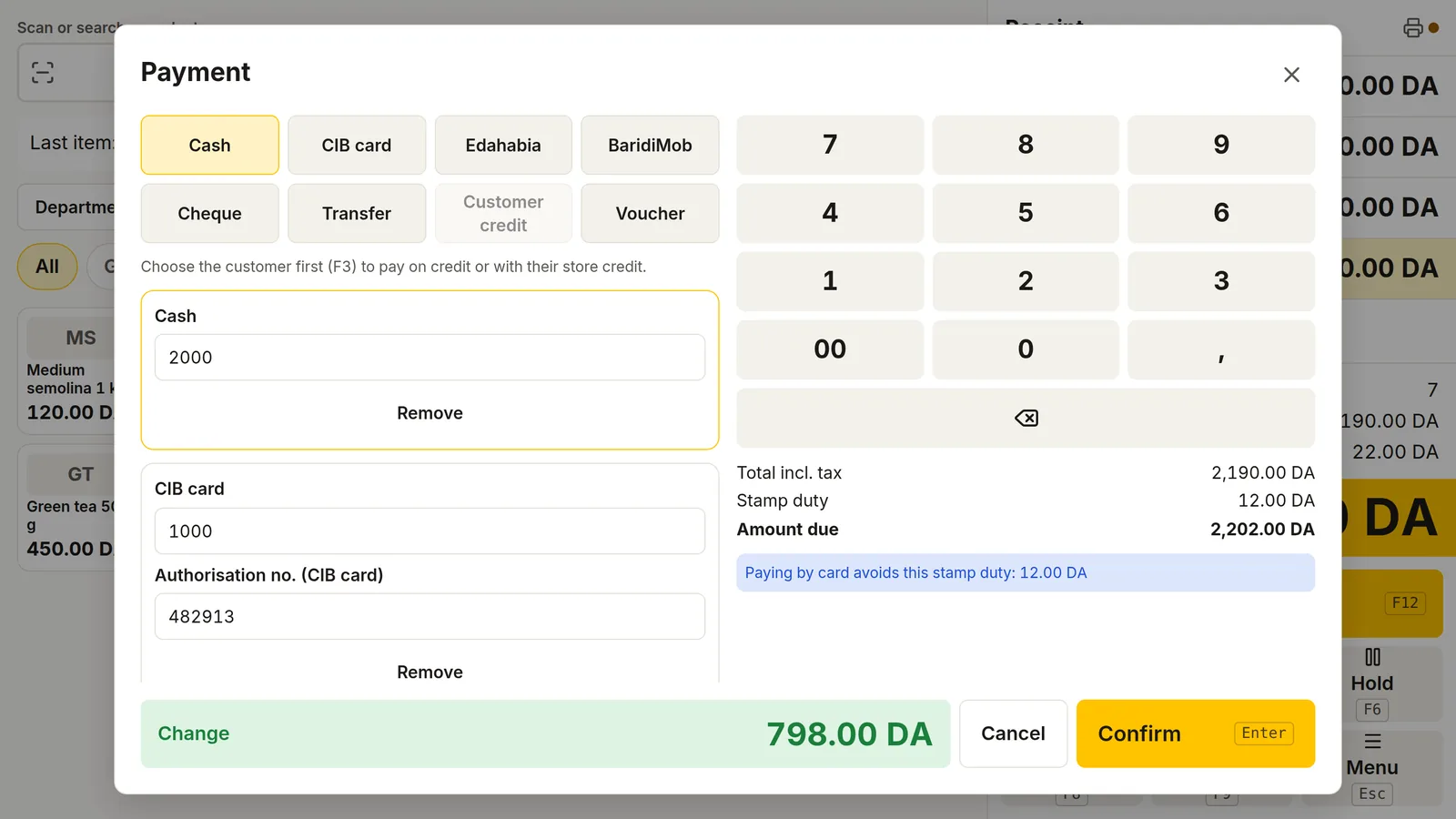
DZBuild POS charges the duty on the cash part of each payment only. In the window above, a 2,190 DA ticket is paid 1,000 DA by CIB card and the rest in cash: the duty is 12 DA, computed on the 1,190 DA paid in cash, and the till shows that paying by card would avoid it. A cheque or a transfer is exempt when the receipt carries its details. A kridi sale is not taxed on the day; the duty applies to each later repayment made in cash. The scale comes from a data file signed by DZBuild, so a new finance law means a new file, installed from a USB stick, not a new program. The owner can also choose to have the shop pay the duty or to turn it off for an exempt shop, and the Stamp duty statement report adds up what was collected for the declaration.
Kridi: customer credit without the paper notebook
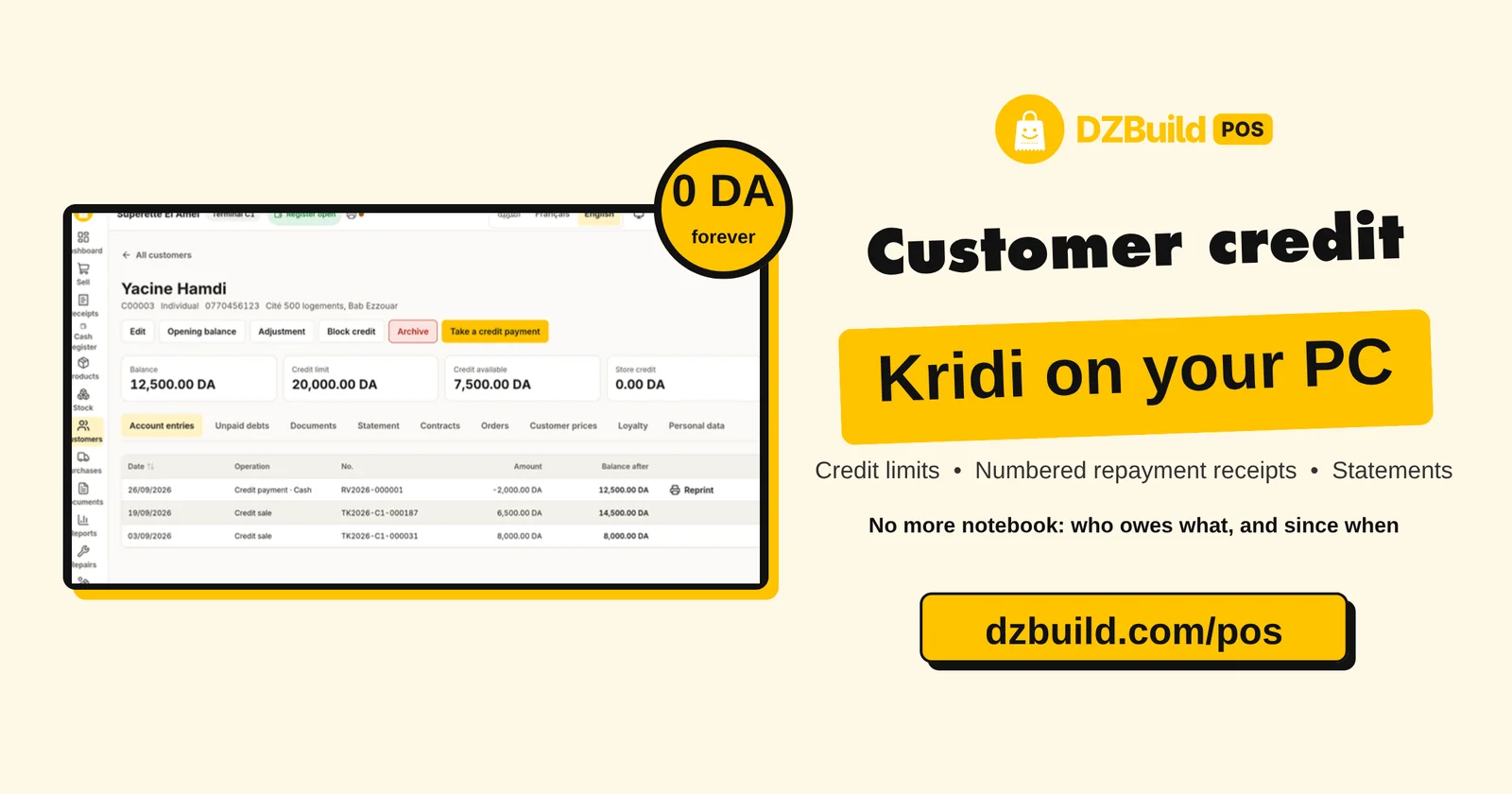
Most neighbourhood shops still keep a notebook of who owes what. DZBuild POS replaces it without changing the habit:
- Opening balance: type what the notebook shows today, once per customer.
- Credit limit: each customer gets a ceiling. A sale above it needs a manager's PIN, and the window shows the balance after the sale.
- Repayments (versements): each one prints a numbered receipt, pays the oldest debts first or the ones you tick, and carries the stamp duty on its cash part.
- Statements: on the receipt printer or on A4, in the customer's language.
- Receivables ageing: a report sorts each customer's debt into 0 to 30, 31 to 60, 61 to 90 and over 90 days.
- Store credit and blocking: keep an advance or a refund on the account, or stop a customer's credit with one button.
Supplier debts work the same way in the other direction, with supplier invoices, payments and statements. Customers are found by phone number, typed with +213, 00213 or Arabic-Indic digits.
Stock, purchases and suppliers
Every stock change is a line in a movement ledger that can never be edited or deleted. A correction is a new line with a reason. On top of that ledger:
- Counts: with the scanner, blind or not, or from the file of a handheld counting terminal.
- Transfers: between the shop, damaged goods and the vans of a delivery round.
- Lots and expiry dates: first expired, first out, with a list of what expires in the next 30 days (the pharmacy module adds its value at cost).
- Serial numbers and IMEI: entered at the sale, checked at the return. A 15-digit IMEI must pass the check digit test.
- Cost: weighted average purchase cost (CMUP), updated on every receipt of goods.
- Purchases: purchase orders, partial receipts, supplier invoices and payments, supplier returns.
- Labels: a label designer for TSPL and ZPL printers and A4 sheets sold in Algerian stationery shops, plus a "to reprint" list after a price change.
Coming from Excel or another program? The import wizard reads xlsx, xls, ods and CSV, including old Windows files in Arabic or French encoding. Column titles can be in Arabic, French or English. It imports products, categories, opening stock, customers, suppliers and their opening balances. A check runs over the whole file first and saves nothing, and the latest import of the day can be undone.
Invoices that follow Algerian law
DZBuild POS prints receipts, quotes, proformas, delivery notes, invoices and credit notes in A4, A5, thermal or PDF, in Arabic, French or English, with the amount written in words.
- Mandatory mentions: an invoice cannot be validated while a mention required by décret 05-468 is missing, such as the RC, NIF or NIS. A missing AI or share capital brings a warning.
- Gap-free numbering: each document type is numbered per year without holes. Receipts are numbered per till, so two tills never use the same number, even offline.
- Validated means final: the database itself refuses any change or deletion of a validated document, payment, stock movement or Z closing. A mistake is corrected with a credit note or a return.
- Tax regime: a shop under the IFU flat tax never shows VAT on its invoices, which carry the IFU mention. A shop under the real regime applies TVA at 19 % or 9 %.
- Arabic on consumer documents: the app warns when a document for a consumer is printed without Arabic (décret 13-378).
The project's README says it plainly: DZBuild POS does not and will not offer fictive invoices, hidden or "non-billable" stock, or deletion of sales. These practices are illegal in Algeria, and a validated document stays as it was printed.
One program for 25 trades
At setup, the owner picks the shop's activity. The template turns on the modules that trade needs and adds its categories. It can be changed later in Settings › Activity and modules, and nothing is deleted when you switch.
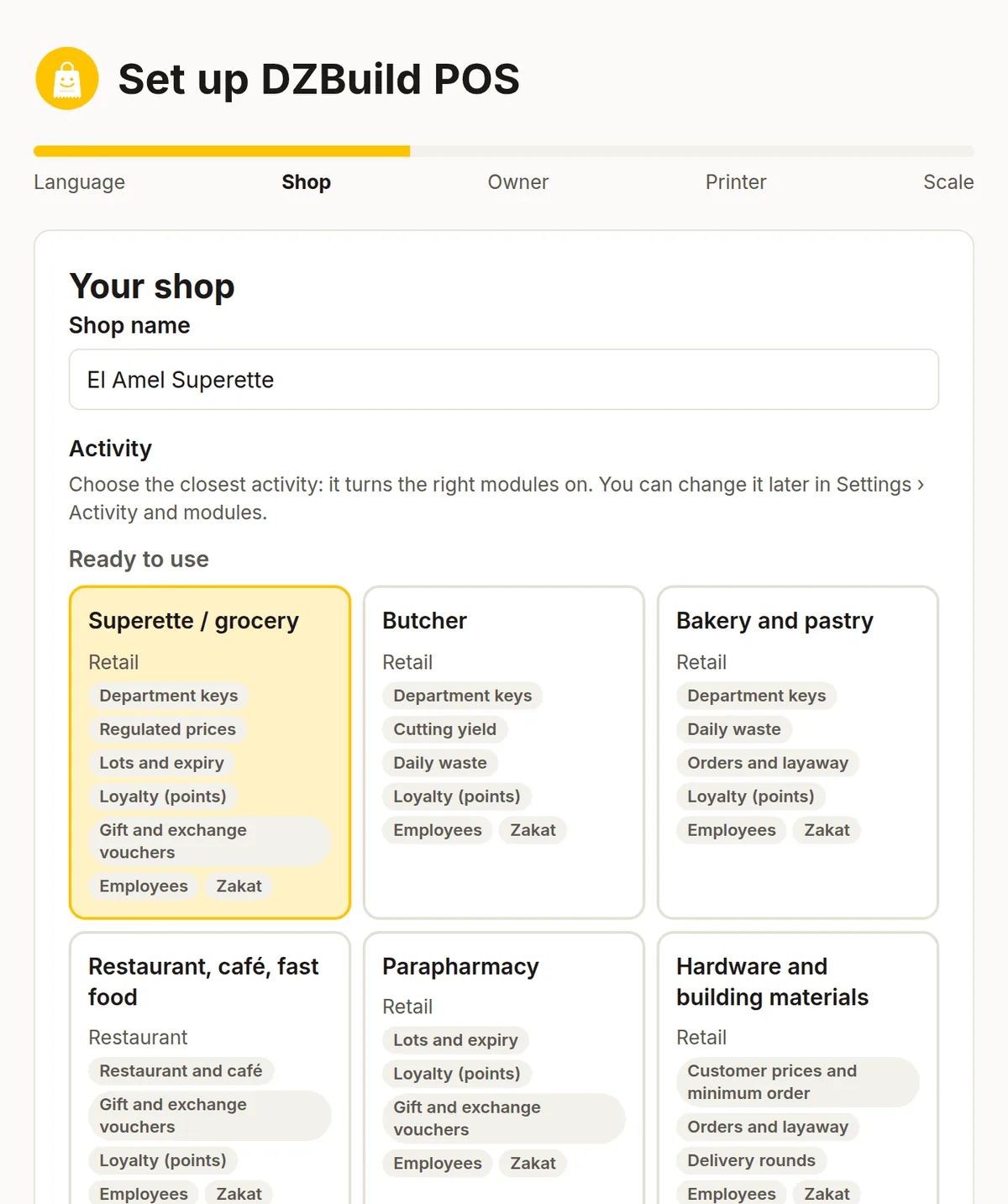
Ready to use (13): supérette and grocery, butcher, bakery and pastry, restaurant, café and fast food, parapharmacy, hardware and building materials, car parts, clothing and shoes, phones and electronics, cosmetics and perfume, wholesaler and distribution, kiosk and multiservice, other shop.
Growing soon (12): bookshop and stationery, appliances on instalments, dry cleaning and tailoring, hair and beauty salon, jeweller, bottled water and gas, importer, workshop and manufacturing, pharmacy, optician, gym, van sales. These templates can be chosen today and their modules work; more ready-made content comes in later versions.
Supérette and grocery
The 2026 data pack knows the 14 staples with a regulated price: subsidised oil in 1, 2 and 5 L (125, 250 and 650 DA), sugar, the 1 L milk sachet (25 DA) and standard and extra semolina in 1, 2, 5 and 10 kg. The till flags these lines and warns or refuses a price above the ceiling, as the owner decides. Department keys let you sell unlabelled goods by typing a price, and F11 weighs fruit and vegetables on a Mettler Toledo or CAS scale.
Restaurant, café and fast food
A floor plan of rooms and tables, tickets per table, takeaway and delivery numbers, a daily menu and options for each dish. Orders go to kitchen and bar printers, each station receiving only its own dishes, in the language you choose for the kitchen. The bill splits by item or by seat, tables merge or move, and comps carry a reason.
Butcher
Cut a carcass into pieces: type its weight and cost, and each cut enters stock at its share of the cost, to the centime, with bone and fat recorded as loss. A daily waste screen records breakage, expiry and own use. Weight barcodes follow the layouts of the Rongta, ACLAS and Dibal scales sold in Algeria.
Pharmacy and parapharmacy
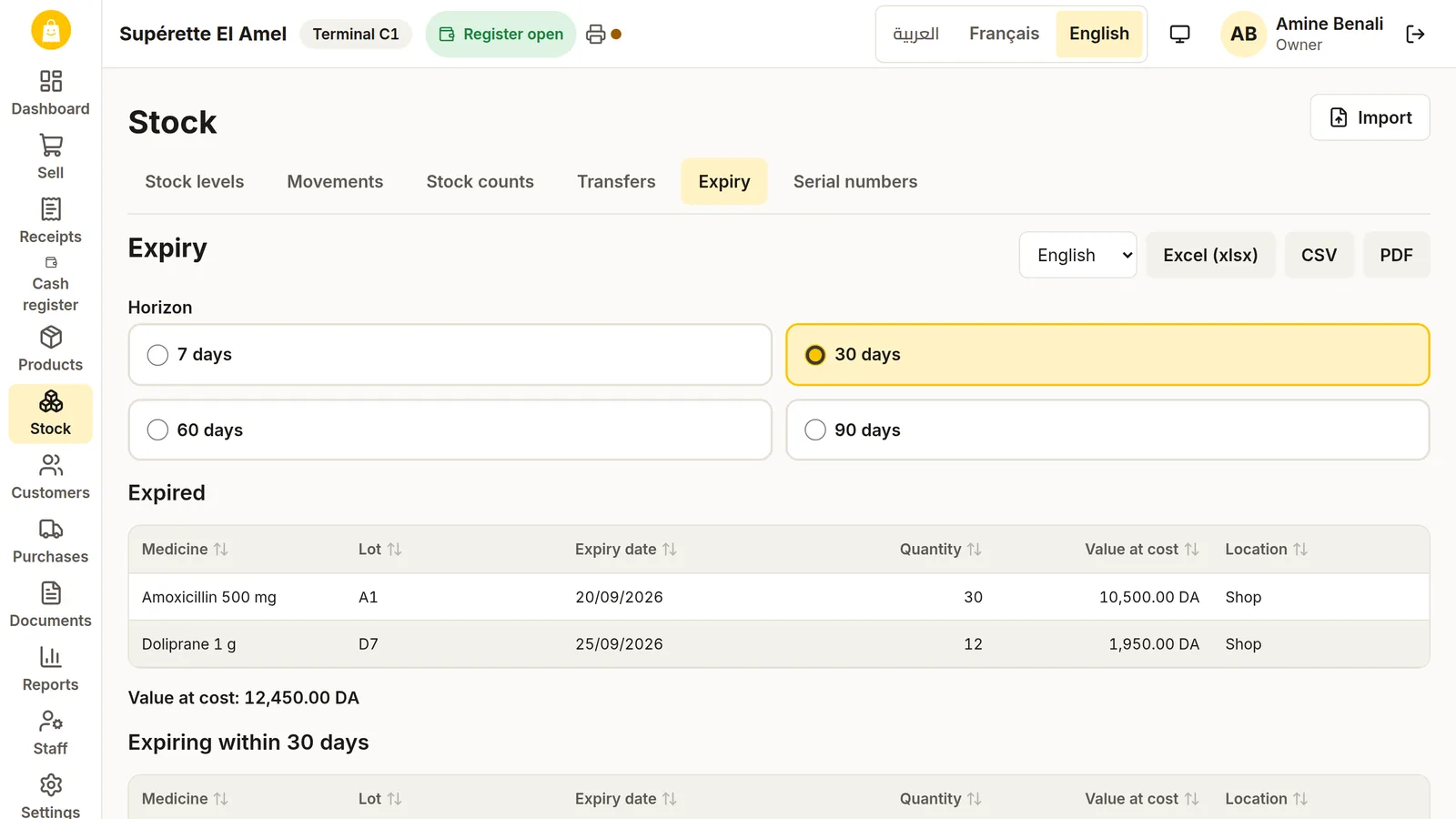
Medicines carry their generic name (DCI), and the till shows other products with the same DCI and which one is cheaper. The Chifa (CNAS) reference prices import from the file the pharmacy receives, and selling a controlled medicine fills a numbered register. The Chifa price is shown for information: third-party payment with the CNAS is not built yet, and the Pharmacy template is still listed under "Growing soon".
Phones, electronics and repairs
IMEI and serial numbers at the sale and the return, warranty certificates (décret 13-327) printed from the receipt, and Flexy top-ups: the operator is guessed from the 05, 06 or 07 prefix, each operator's float goes down with each top-up, and the shop's commission is tracked. The till records the top-up; it does not send it by USSD. The repairs module prints a numbered intake slip, follows each device from diagnosis to pickup and prepares a "ready" message to paste into WhatsApp.
Wholesale and van sales
Prices per customer, minimum order quantities, cartons and packs sold by their own barcode, and delivery notes that stand as invoices once the tax office's decision number is entered. Delivery rounds print a route sheet, record what each stop paid and turn every collection into a receipt. A van is a stock location the till can sell from.
Jewellery
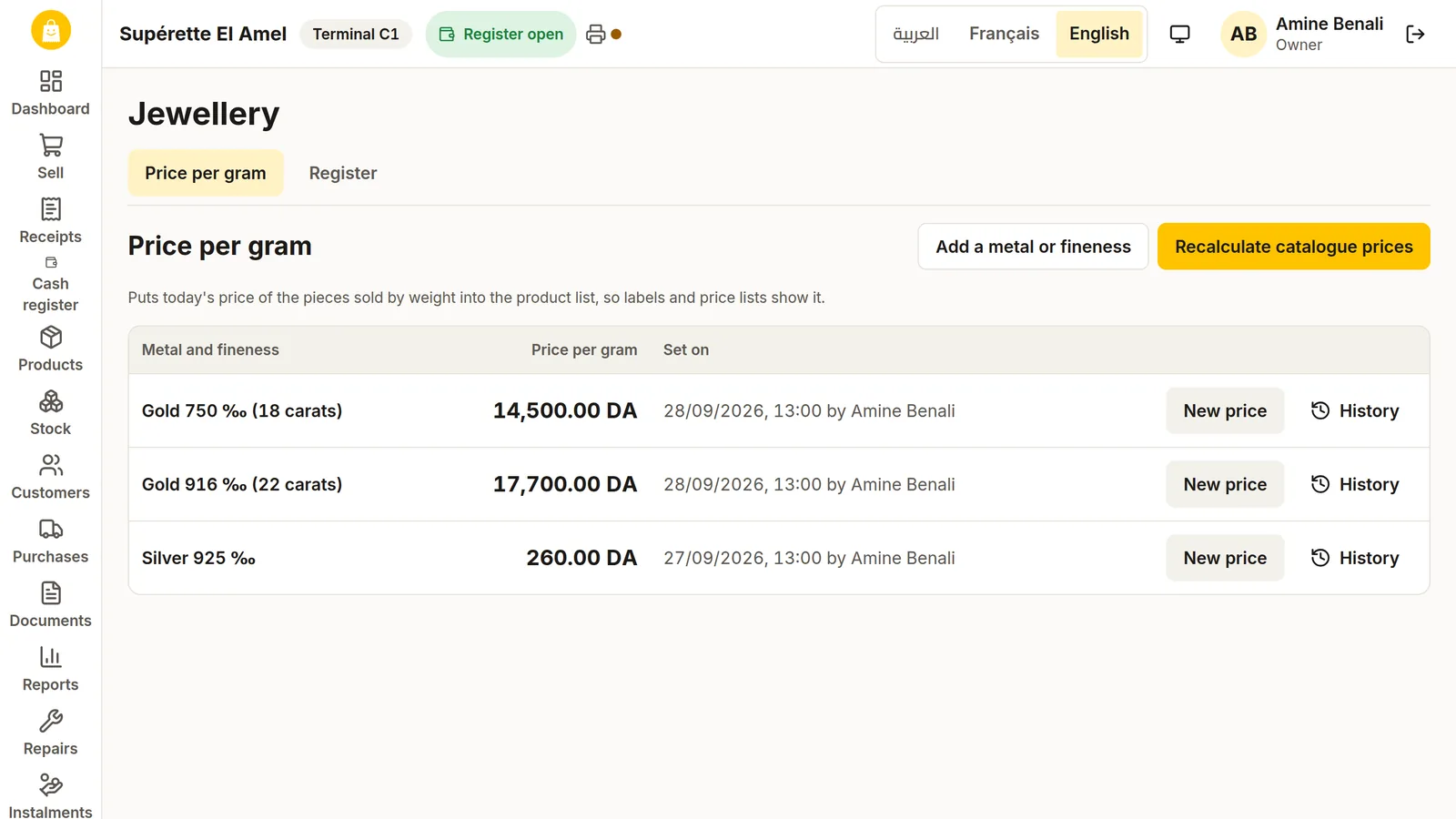
Each piece has its metal, fineness, weight, making charge (façon) and hallmark. The price per gram board keeps its history, and a piece priced by weight is computed at the till from today's price. Every sale fills the jeweller's special buyer register with the buyer's ID document.
Appliances on instalments
An instalment contract in five steps: customer, items at the instalment price, terms, supporting documents and signature. The documents list includes the CCP statement or RIP and a guarantor; a guarantee cheque is deliberately left out because it exposes the customer to criminal proceedings. Up to 24 monthly dues by default, reminders to copy, and a report of overdue instalments.
Zakat, promotions, loyalty and other built-in tools
These modules are in the free edition too, and the download page names only a few of them:
- Zakat: an indicative zakat statement on trade goods, with the Hijri date. You enter the nisab the Ministry of Religious Affairs publishes for the year, and the statement keeps it with its source.
- Promotions and legal sales: percentage, per item, "buy X get Y free" and bundle prices, plus seasonal sales, clearance and unpacking sales with the declaration for the trade directorate.
- Loyalty and vouchers: points per 100 DA, loyalty vouchers, gift vouchers sold at the till and exchange vouchers for returns, each with its own barcode.
- Expenses: rent, electricity, wages and transport, paid from the drawer or from the back office, feeding the profit and loss report.
- Employees: salary advances and a commission rate per seller, with their reports.
- Orders, layaway and appointments: deposits with a numbered receipt, stock set aside until the customer pays, and an appointment book per employee.
- Help in the app: 52 help pages in each language, opened with F1 on the current screen, and a quick card to print and keep next to the till.
- A demo shop: "Supérette El Baraka" opens in a separate database to practise, and disappears when you leave it.
- Slow PCs: a light mode for a Celeron with 4 GB of RAM, larger text, and an on-screen keyboard in AZERTY or Arabic for touch screens.
60 reports and a G50 helper
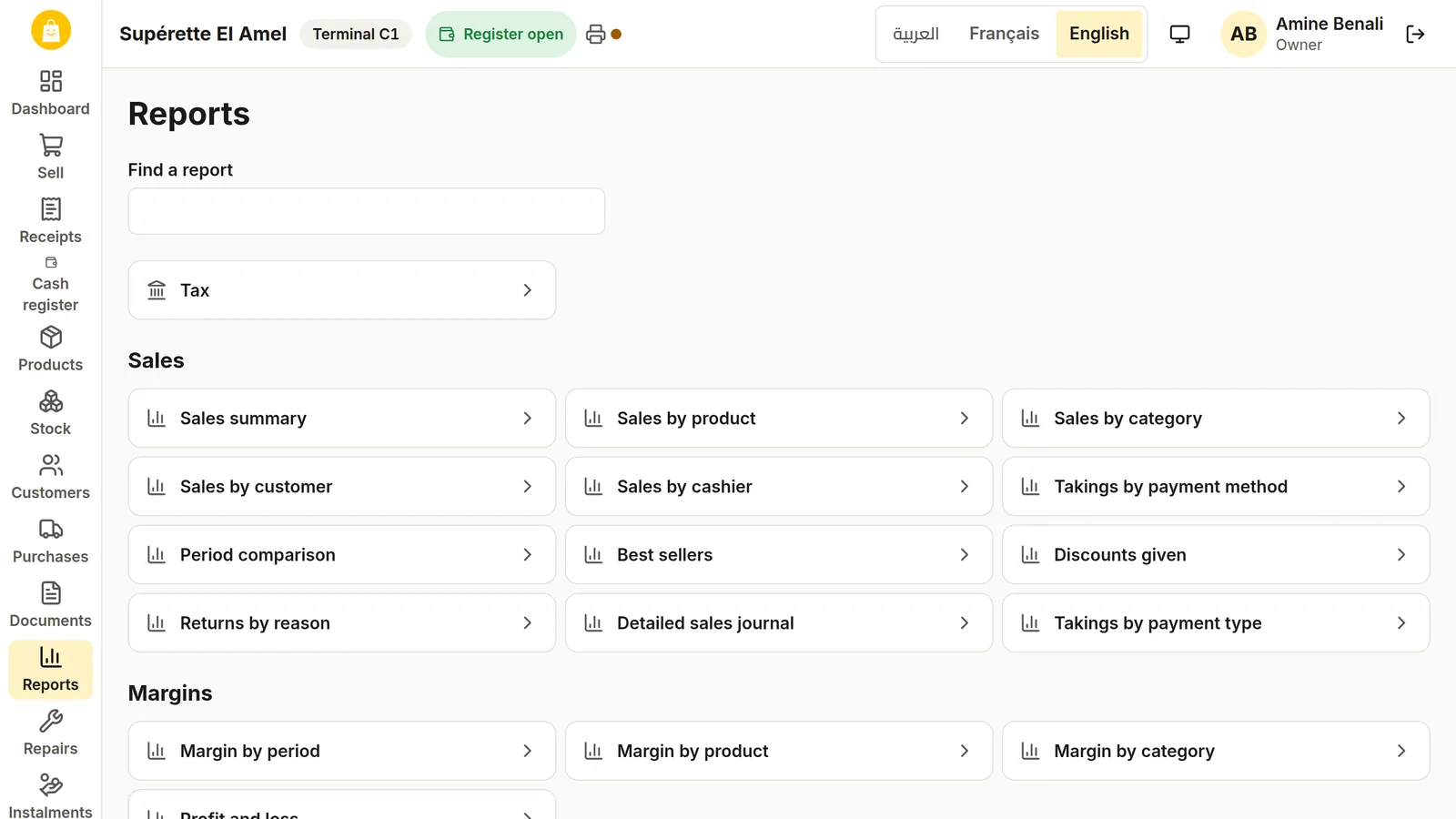
DZBuild POS has 60 reports: 45 for every shop and 15 that appear when a trade module is on, such as cutting yields, Flexy commissions or overdue instalments.
| Group | Reports | Examples |
|---|---|---|
| Sales | 12 | Sales by product, by cashier, by payment method, best sellers |
| Margins | 4 | Margin by product, simplified profit and loss |
| Stock | 7 | Stock valuation, low stock, expiry, count differences |
| Purchases | 3 | Purchases by supplier, supplier balances |
| Customers and credit | 4 | Customer balances, receivables ageing |
| Cash | 5 | Cash sessions, daily takings, expenses by category |
| Declarations | 1 | Seasonal sale declaration |
| Tax | 9 | VAT by rate, stamp duty statement, G50 helper, IFU turnover, sales and purchase registers |
| Trades | 15 | Sales by table, controlled medicines register, jeweller register |
Every report exports to Excel, CSV or PDF in Arabic, French or English. The G50 helper shows the figures box by box with copy buttons; it does not file the declaration for you. A user without the margin permission sees the reports with the cost and margin columns removed (purchase reports keep their costs).
Several tills on one shop network, without internet
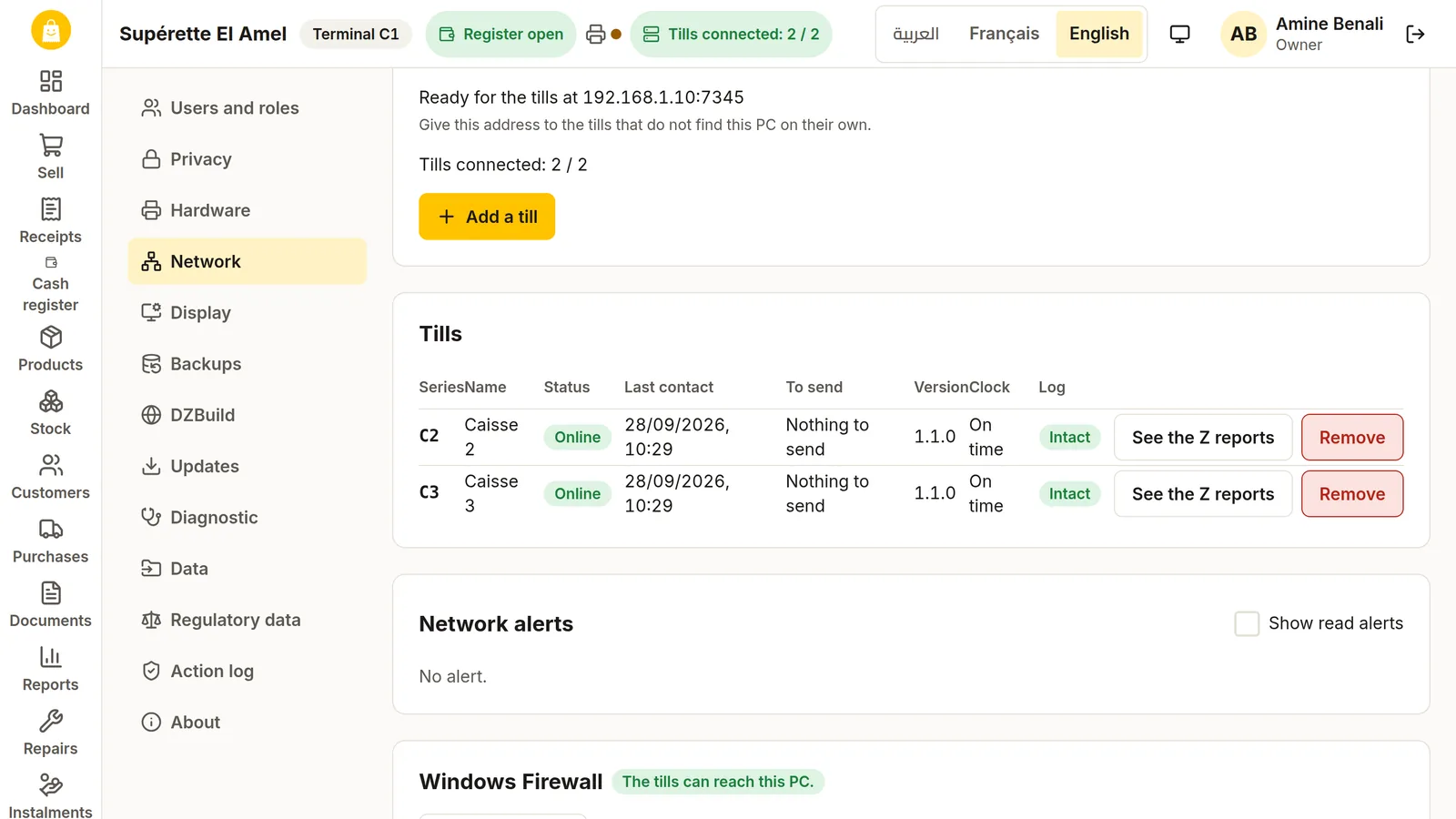
- On the PC that keeps the books, click Make this PC the main PC.
- Click Add a till: a 6-digit pairing code appears, valid 10 minutes.
- On each other PC, choose Join a main PC. The main PC is found on the network by itself; type the code.
The main PC holds products, prices, customers, users and settings, and every till keeps a copy. If the network or the main PC goes down, each till keeps selling, numbers its own tickets and sends everything when the connection returns, without counting a sale twice. The installer opens the needed ports in Windows Firewall for the private network only. The app sets no limit on the number of tills.
Staff, PINs and the action log
Each person signs in by tapping their name and typing a PIN of 4 to 8 digits. Easy PINs such as 1111 or 1234 are refused, and five wrong PINs lock that user for five minutes. Eight roles come built in: owner, manager, cashier, storekeeper, waiter, technician, accountant and employee, and the owner can create others from 46 permissions. Each cashier has a discount limit in percent; a manager's PIN lifts it only up to the manager's own limit.
Every important action, 270 kinds in all, goes into an action log where each line is sealed to the one before. A Check the log button proves that no line was changed or removed.
Hardware that works with it
| Device | What is supported |
|---|---|
| Receipt printer | ESC/POS 58 or 80 mm (Xprinter, Epson TM, Rongta and generic) by USB, network or COM port. Arabic prints as an image, logo, receipt barcode, partial or full cut |
| Label printer | TSPL (Xprinter, TSC) and ZPL (Zebra, Godex), 203 or 300 dpi, Arabic labels, A4 label sheets |
| Barcode scanner | USB scanners in QWERTY or AZERTY mode, COM scanners, handheld counting terminals |
| Scale | Mettler Toledo 8217, CAS, generic scales, and weight or price barcodes from label scales |
| Cash drawer | Through the receipt printer (RJ11) or a USB/COM adapter |
| Customer display | A second monitor, or a small pole display (VFD) that shows Latin letters only |
Your data stays on your PC
- Automatic backups: every day, at every Z closing, every hour while a drawer is open, before every update and on closing. The app keeps 14 daily, 8 weekly and 12 monthly copies.
- A second copy: to a USB stick or another folder, checked after writing.
- Guided restore: if the data will not load, the app opens a restore screen.
- Move to another PC: one .dzpos file carries the whole shop.
- Your data belongs to you: export every table to a zip of CSV files.
- Signed updates: they install only when every cash drawer is closed.
None of the shop's data leaves the PC unless the shop links an online store, and there is no cloud backup to pay for.
Link it to a DZBuild online store (optional)
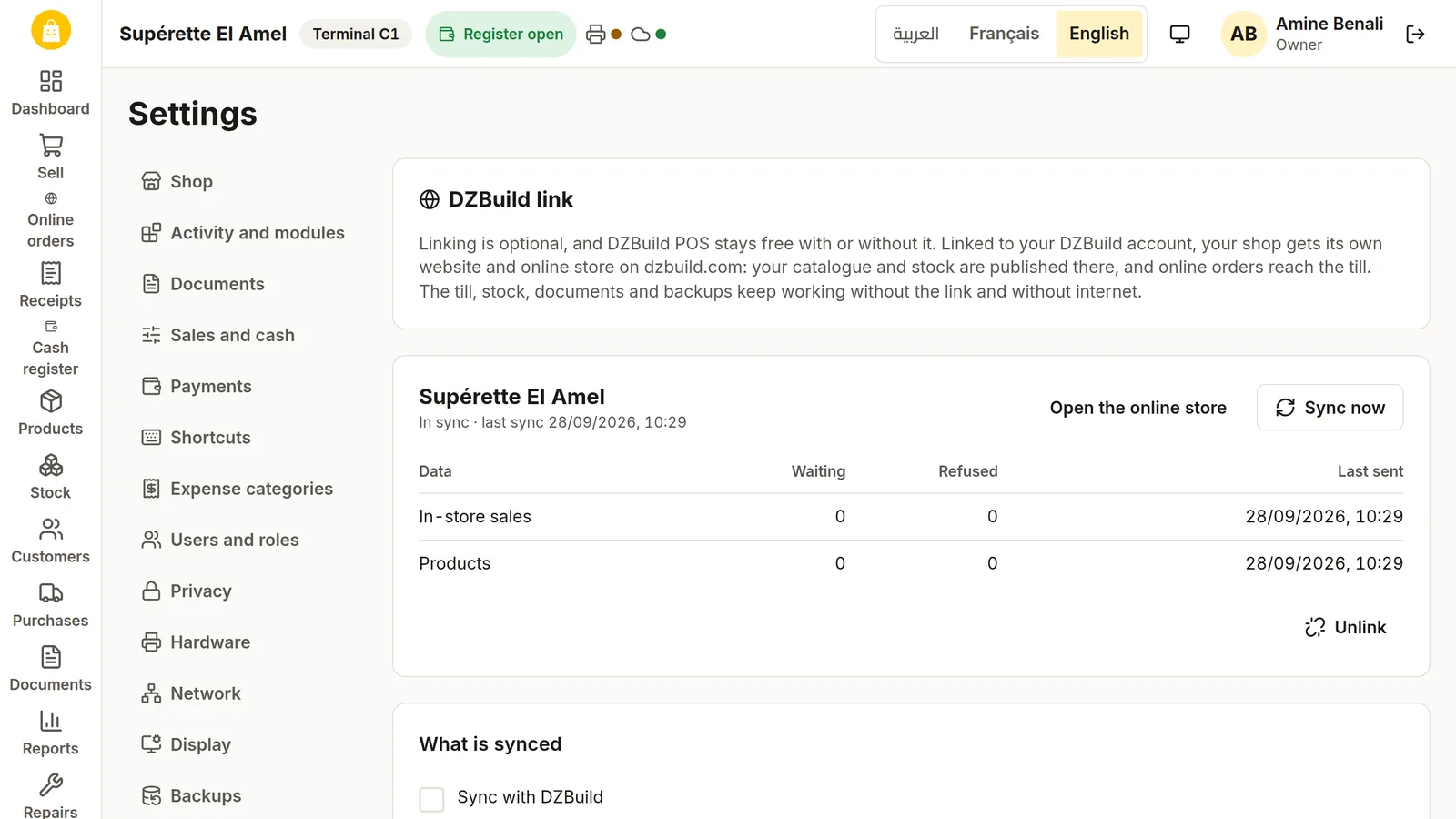
A shop that also wants to sell online can link the POS to a DZBuild store. The till never asks for your DZBuild password: you sign in on dzbuild.com, or type a code shown by the till on your phone. Then:
- the products you choose and their stock are published on the online store;
- online orders arrive at the till, where you claim, prepare, ship or refuse them;
- in-store sales, refunds and Z closings show in your DZBuild dashboard;
- the till warns you about buyers DZBuild has flagged, before you prepare the order.
Each part has its own switch, and the till never waits for the internet during a sale. Without the link, nothing changes.
Free, paid or cracked: what shops in Algeria pay
On Ouedkniss, the paid shop programs we found cost a median of 18,000 DA, and half of them sit between 12,000 and 35,000 DA (137 listings with a price, read on 11 October 2026). Programs sold on subscription cost from about 12,000 DA to 120,000 DA a year. The free offers we found are limited to one PC or two tills, stop after a 7, 15 or 30 day trial, or do not publish their limits.
Many Arabic searches for a free cashier program lead to "activated for life" copies of paid programs on YouTube and file-sharing sites. A cracked program gets no fiscal update when the finance law changes the stamp duty, comes from an unknown file, and leaves the owner alone with the risk. DZBuild POS costs nothing, its updates are signed, and its regulatory data is updated by a signed file.
What open source means for your shop
DZBuild POS is free software under the GNU General Public License, version 3 or later. For a shop owner, that means:
- every version already published stays free under the GPL for good, and anyone may keep building and sharing it;
- anyone can read the code and check what it does with the shop's data;
- a local developer can fix or adapt it for you;
- shops and technicians can report problems and translation fixes on GitHub.
The names "DZBuild" and "DZBuild POS" and the logo stay trademarks of DZBuild.
Install it and make your first sale
- Download the setup from dzbuild.com/pos and run it.
- Choose Arabic, French or English. You can open the demo shop first to practise.
- Enter the shop name, its activity, its tax regime (IFU or real) and its wilaya. The list has all 69 wilayas.
- Enter the owner's name and a PIN. Keep it safe: you need it to restore a backup.
- Let the app detect the receipt printer and print a test page. Supérettes, butchers and bakeries also set up the scale.
- Open the cash register with the float in the drawer, scan the first item and press F12.
Stuck at a step? The DZBuild POS help page lists the support channels and the common problems, and F1 opens the help of the screen you are on.
Questions shop owners ask
Is DZBuild POS really free?
Yes. DZBuild POS costs 0 DA, with no licence key, no subscription, no account and no time limit. Every feature and every trade module works in the free edition, and the source code is published under the GPL-3.0-or-later licence. Download it from dzbuild.com/pos.
Does DZBuild POS work without internet?
Yes. Selling, stock, kridi, documents, reports and backups all run on the PC with no connection. Several tills talk over the shop's local network, not the internet. Internet is used only for updates and for the optional link to a DZBuild online store.
Which Windows versions does DZBuild POS run on?
Windows 10 version 1809 or later and Windows 11, 64-bit or 32-bit. There are four setups: 64-bit and 32-bit, each in an online version of about 14 MB and an offline version of about 200 MB for PCs with no internet. Windows 7 and 8.1 are not supported.
How is the stamp duty on a cash sale calculated in Algeria in 2026?
Cash payments up to 300 DA are exempt. Above that, the duty is 1 DA per 100 DA or part of 100 DA up to 30,000 DA, 1.5 DA per 100 DA up to 100,000 DA and 2 DA per 100 DA above, applied to the whole amount, with a 5 DA minimum. Card, Edahabia and BaridiMob payments are exempt. A 25,000 DA cash payment carries 250 DA. DZBuild POS computes it on the cash part of each payment.
Can I record customer credit (kridi) in DZBuild POS?
Yes. You type each customer's opening balance from the paper notebook once, set a credit limit, sell on kridi and record each repayment with a numbered receipt. Going over the limit needs a manager's PIN. Statements print on the receipt printer or on A4, and a report shows how old each debt is.
Does it work with my barcode scanner and receipt printer?
Yes, with USB barcode scanners on French AZERTY or Arabic Windows, and with ESC/POS receipt printers in 58 or 80 mm such as Xprinter, Epson TM and Rongta, connected by USB, network or COM port. Arabic receipts print as an image, so they never come out as question marks. Label printers, scales, cash drawers and customer displays are supported too.
Can I use DZBuild POS on several PCs in the same shop?
Yes. One PC becomes the main PC and each other till joins it with a 6-digit pairing code on the shop's network, without internet. Each till keeps selling if the network or the main PC goes down and sends its sales when the connection returns. The app sets no limit on the number of tills.
Which shops can use DZBuild POS?
Any shop. Setup offers 25 trade templates, including supérette, butcher, bakery, restaurant and café, parapharmacy, hardware, car parts, clothing, phones, cosmetics, wholesale, kiosk, pharmacy, jewellery, optician and appliances on instalments. A template turns on the modules that trade needs, and any module can be switched on later.
Do I need a DZBuild online store to use the POS?
No. The POS works on its own and nothing in it depends on an account. A shop that also sells online can link it to a DZBuild store to publish its catalogue and stock and receive online orders at the till. The link is free to set up and DZBuild POS stays free either way.
Why does Windows show "Windows protected your PC" when I install it?
The setups are not code-signed yet, so Windows SmartScreen may warn. Click More info, then Run anyway, but only if you downloaded the file from dzbuild.com/pos or from the official DZBuild POS page on GitHub. A technician can also compare its SHA-256 with the SHA256SUMS.txt file of the release.
Download DZBuild POS for free · Help and support · Source code on GitHub